
EHR Transition Guide: 6 Steps to Successfully Transfer PDFs and Medical Records

by Vince Hartman
Jan 16, 2025
As a healthcare IT expert who has overseen numerous EHR transitions and prior record backloads, I can attest to the complexity and challenges of transitioning to a new EHR system. Whether your old EHR system lacked the functionality to comply with new government regulations or the costs became unsustainable, the process of migrating patients’ prior medical records to the new system can feel overwhelming. Don't worry! Let me share insights from my experience to help guide you through a successful EHR transition, with a focus on transferring PDFs and prior medical records.
1. Plan Your EHR Data Transition
Before diving into the technical aspects, it’s crucial to understand the financial implications of an EHR transition. The costs can be substantial, often exceeding a million dollars for larger organizations. These expenses include:
- New EHR software and implementation
- Ongoing costs of the old EHR during transition
- Hardware upgrades
- Consulting fees
- Training and personnel costs
The sensitive nature of the information transferred during this process requires strict adherence to current medicolegal standards. Data loss and breeches represent the greatest risks throughout the transition, so various strategies with multiple levels of financial cost are often employed by transitioning health systems to mitigate those risks.
Some health systems choose to convert only key demographic and clinical data to the new EHR while maintaining access to legacy systems for historical data. This approach can help manage costs, especially given the lengthy retention periods required for medical records. Other systems convert chart data directly to PDF documents, which reduces overall transfer time but increases the risk of data loss as the newly converted documents lose the ability to query specific data. This strategy, however, does preserve the medical narrative without significantly altering the cost.
Regardless of your overall plan, physician burnout and the time investment should be important considerations. While increasing the overall financial burden, using third party software like Abstractive Health to streamline the process can make the overall experience much easier while you work to assemble the perfect team.
2. Assemble the Right Team for Your Transition
A successful EHR transition requires a diverse team of professionals. In my experience, your team should include:
- IT Staff: Often requiring additional hires.
- Clinical Specialists: For training and support.
- Leadership: For strategic guidance and decision-making.
- Consultants: Helpful but may lack institutional knowledge.
- Clinical Informaticists: Essential for leading subprojects and bridging clinical and technical needs.
- Legal: To ensure adherence to proper standards and regulations during the process.
Remember, this isn’t just an IT project. A network of clinical subject matter experts is necessary to evaluate and endorse the clinical content within the EHR, such as order sets and alerts. Clinical informaticists play a critical role in translating clinical needs into technical builds, while also preventing data loss.
Communication between each role is crucial; even slight errors in procedure could lead to data breaches and place your health system under legal scrutiny. A good team can help you develop a formal risk assessment and create a robust safety monitoring profile to be used during and even after the transition process.
3. Assess Your New EHR’s Data Backlog Capabilities
One of the most critical aspects of the transition is ensuring proper data backup and maintaining data integrity. This is vital for patient safety, clinician satisfaction, and positive health outcomes. Errors during data migration—such as doubling a patient’s medication dosage—can have serious consequences.
When transferring PDFs and text documents, system compatibility becomes crucial. While some unstructured data can be migrated automatically, it’s not always straightforward. Recent advances in SMART on FHIR technology offer promise, but large-scale transfers of diverse data types from legacy systems remain challenging. Automated transfers can often require a second set of eyes to ensure data fidelity, especially with difficult-to-parse formats like PDFs. This can often increase costs and the time investment during the entire project.
In cases where two systems aren’t fully compatible, a specialized intermediary storage or transfer system may be needed.
4. Use External Storage Solutions for Text and PDFs
If your new EHR doesn’t support a complete backload of text and PDFs, consider external storage solutions like Abstractive Health. This option is particularly useful for managing large volumes of unstructured data.
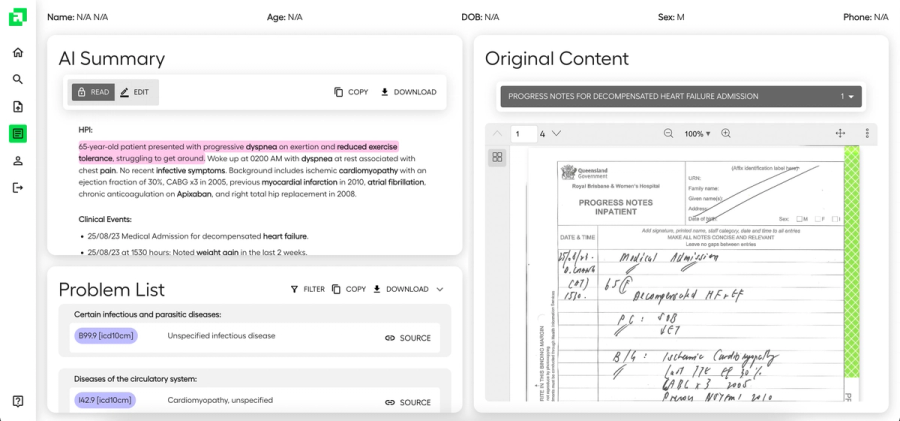
Once PDFs of patient records have been generated, users can upload it to Abstractive Health. Our technology can help both store that data and summarize it to ease the transition process.
The Abstractive Health app, in partnership with Reducto AI, uses object character recognition (OCR) to extract text from PDFs. Key features include:
- Capturing metadata such as tables, headers, handwritten text, and bolded characters.
- Splitting large documents into subsections to differentiate between clinical encounters.
- Recognizing handwritten notes.
Once all of that data has been extracted, Abstractive Health’s technology can then provide a comprehensive summary of the complete patient chart. Their summarization technology is clinically accurate with published academic findings, a patent filed, and third place out of 200 companies by the VA in a competition for trustworthy AI for clinical summarization.
Through a partnership with Carequality, Abstractive Health also has the capability to pull in external patient records from outside health systems and include them in the patient summaries.
5. Link External Storage Solutions with SMART on FHIR
When implementing external storage solutions, ensure seamless integration with your new EHR system. Using SMART on FHIR technology—mandated under the 21st Century Cures Act and the USCDI standard—can facilitate this integration.
External storage solutions like Abstractive Health open as a separate window via an activity button in your new EHR system. This allows clinical staff to maintain an efficient workflow while directly accessing both chart summaries and a log of previous uploaded medical records.
6. Go-Live with Your New EHR System
The go-live phase marks the culmination of your preparation and planning. Ensure you have:
- Adequate training sessions for staff.
- A clear communication plan for addressing issues.
- Post-go-live support to troubleshoot and optimize system performance.
With proper planning, the right team, and robust tools like Abstractive Health, your EHR transition can be a smooth process that sets your organization up for long-term success.

See the Abstractive Health AI assistant in action to discover what real efficiency can look like.
Try for freeStay ahead of the curve in healthcare innovation.
Connect
Abstractive Health
Resources
©2026 Abstractive Health. All Rights Reserved.